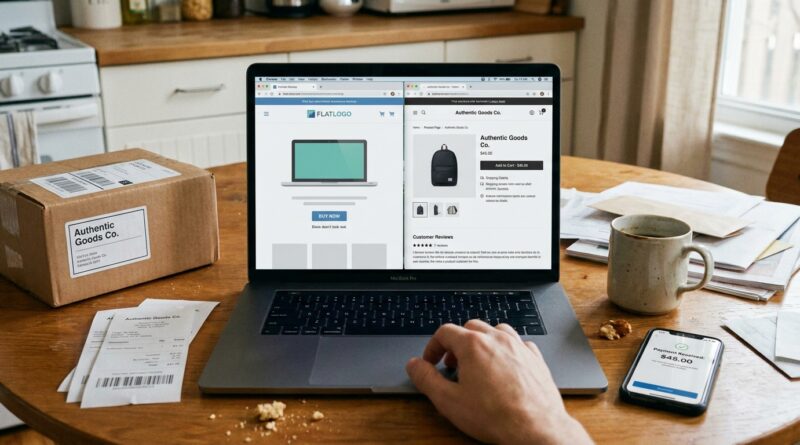
New USPTO ‘Mockup’ Crackdown Quietly Turns Your Product Photos Into Red Flags: How To Prove Real Use Before Your Trademark Gets Questioned
You did the work. You picked a name, filed for a trademark, built a Shopify page, maybe listed on Amazon, and took a few clean-looking product shots in Canva. Now the USPTO is looking at those same images and thinking, “This might be fake.” That feels unfair, because for a lot of small brands, mockups are just how you get started. But the USPTO trademark mockup crackdown online use evidence issue is real, and it is catching founders who thought their website screenshots were enough. If your store cannot actually take payment, if your photos look digitally stamped, or if your listing reads like a placeholder catalog page, your proof of use can get questioned fast. The good news is this is fixable. You do not need a legal team the size of Nike’s. You need better receipts, better screenshots, and a storefront that looks like a real store because it is one.
⚡ In a Hurry? Key Takeaways
- The USPTO now treats mockup-heavy product pages, nonfunctional stores, and generic listings as warning signs, not solid proof of trademark use.
- Fix it by saving real-world evidence now. Order pages, checkout screens, dated product photos, packaging shots, invoices, shipping records, and customer-facing listings.
- Good brands can still get flagged, so cleaning up your evidence today can help you avoid office actions, expungement petitions, and painful challenges later.
Why founders are suddenly getting nervous
The USPTO has been paying much closer attention to whether a trademark is actually being used in real commerce. Not pretend commerce. Not “coming soon” commerce. Real sales, real products, real customer-facing use.
That matters because trademark rights in the U.S. are tied to use. If you say your mark is in use for certain goods, the USPTO wants proof that an ordinary buyer could really see the mark on the goods, packaging, labels, or in a working online point of sale.
For years, a lot of small businesses submitted website screenshots that looked polished enough to pass. Some were real. Some were heavily staged. Some were flat-out fake. The problem is that the cleanup effort aimed at bad actors is also pulling honest indie brands into the same net.
What the USPTO is actually suspicious of
This is where the trouble starts. The USPTO is not banning nice-looking product photos. It is looking for signs that the “use” shown in your specimen is more like advertising theater than an actual sales listing.
1. Mocked-up product photos
If your logo looks digitally pasted onto a mug, shirt, box, bottle, or tag, that can raise eyebrows. A polished image is fine. A product render that looks like a logo sticker floating on stock art is not great.
2. Store pages that cannot really sell anything
If your page has no working checkout, no add-to-cart flow, no price, no buying info, or no way to complete a purchase, it may not count as a valid point of sale. A pretty homepage is not enough.
3. Generic catalog-style listings
If the page looks like a template with thin product detail, stock photos, and vague descriptions, the USPTO may see it as more like promotion than actual use in commerce.
4. Marketplace listings that look unfinished
Amazon, Etsy, Walmart Marketplace, and Shopify can all work as evidence, but only if the listing is clearly live and actually supports a sale. Draft pages, unavailable listings, or “currently unavailable” screens can hurt more than help.
5. Evidence that appears inconsistent
If your application says first use was in 2022, but your website was created last month, or your specimen shows design elements that did not exist at the claimed date, expect questions.
Why this matters even if your brand is completely legit
Here is the annoying part. You can be honest and still look suspicious on paper.
Maybe you started with print-on-demand samples. Maybe your first photos were mockups because the real packaging had not arrived yet. Maybe your Shopify store was live, but you paused checkout while fixing shipping rates. Those are normal startup problems. Still, to an examiner or challenger, the file may look weak if your proof does not show real use clearly.
And once questions start, they can snowball. You might get an office action asking for better specimens. A competitor might file an expungement or cancellation effort. An Amazon dispute could get uglier because your underlying trademark evidence is shaky.
What counts as better proof of real trademark use
Think like a skeptical stranger. If someone had to decide whether your brand is truly selling goods, what would convince them in 30 seconds?
For physical goods
Strong evidence often includes:
- Photos of the actual product with the mark on the product itself, tag, label, or packaging
- A live product page with the mark, price, and a working add-to-cart or buy-now option
- Screenshots showing the checkout path is real
- Invoices, shipping confirmations, or order receipts tied to the goods
- Packaging inserts, hangtags, box labels, or bottle labels with the mark
For software or digital products
The rules can differ a bit, but the same common-sense idea applies. Show the mark where customers encounter it during actual download, purchase, subscription, or use. A splash page alone may not carry much weight if it does not connect to real commerce.
A simple 7-step evidence cleanup any founder can do today
You do not need to panic. You need a folder.
Step 1. Take fresh photos of the real thing
Use your phone. Good light helps. Show the mark clearly on the product, label, tag, packaging, or container. Avoid images that look overly edited.
Step 2. Capture the full product page
Take screenshots that show the URL, date if possible, product name, price, and purchase button. If the listing is on Amazon or Etsy, make sure it is clearly live.
Step 3. Test your own checkout
Go through the buying process as a customer would. If checkout breaks, fix that first. A store that cannot take payment is a red flag.
Step 4. Save transaction proof
Keep invoices, Stripe or Shopify order records, shipping labels, and fulfillment confirmations. These can be very helpful if someone later questions whether sales were real.
Step 5. Match the mark exactly
The mark in your application should match what appears on the goods or listing. Tiny style differences are one thing. A different brand name is another.
Step 6. Save dated copies regularly
Do not wait until you get challenged. Save records now and keep doing it monthly or quarterly. Old screenshots are hard to recreate once a site changes.
Step 7. Remove weak specimens from your mental “proof pile”
If an image is clearly a mockup, treat it as marketing art, not legal evidence. Keep it for ads if you want. Just do not rely on it to prove trademark use.
Red flags that should make you stop and fix things
If any of these sound familiar, take a closer look:
- Your product photos came from a mockup generator and were never replaced
- Your brand name appears only on the website, not on the goods or packaging
- Your store has no working buy button or checkout process
- Your listing uses stock images shared by many sellers
- You filed based on use before you had actual sales-ready goods
- Your screenshots are cropped so tightly they do not show the context of a real sales page
What to do if the USPTO already questioned your specimen
First, do not ignore it. Deadlines matter.
Second, do not just send another prettier screenshot of the same problem. If the issue is that your proof looks staged, send stronger evidence that shows real commercial use.
That may mean:
- A substitute specimen from the right time period
- A verified statement explaining the specimen was in use at the relevant date
- Photos of packaging or labels actually used in sales
- A clearer point-of-sale webpage with functioning purchase features
If the facts are messy, this is one of those times when a trademark attorney earns their fee. Especially if your filing dates, first-use dates, or submitted screenshots are inconsistent.
The difference between “marketing materials” and “trademark use”
This is the part many founders miss.
A beautiful Instagram post is marketing. A brand deck is marketing. A homepage teaser is marketing. A mockup on a “coming soon” page is marketing.
Trademark use for goods usually means the mark is tied to actual goods being sold or transported in commerce, and customers can see that connection in a real-world way. The safer your evidence shows that connection, the better.
At a Glance: Comparison
| Feature/Aspect | Details | Verdict |
|---|---|---|
| Canva or stock-photo mockup | Logo appears pasted onto a product render with no proof the item exists and is being sold | Weak evidence. High risk of scrutiny. |
| Live product page with working checkout | Shows mark, product, price, and real purchase path that a customer can complete | Strong evidence. Much safer. |
| Photos of product, packaging, and sales records | Dated real-world proof that the goods exist and moved through actual commerce | Best backup. Keep this on file. |
Conclusion
The frustrating truth is that the USPTO has quietly updated and clarified how it spots sham online use, including sites that cannot actually take payment, generic stock-photo catalogs, and mocked-up product shots with a logo dropped on top. That means plenty of honest indie brands now look suspicious when their evidence is reviewed cold. The fix is not to make your brand look fancier. It is to make your proof look real because it is real. Save clear product photos, show a working checkout, keep records of orders and shipping, and stop relying on mockups as legal support. A few boring screenshots and receipts today can save you from expungement petitions, failed filings, and ugly surprises when a bigger company comes asking whether your trademark use was ever real in the first place.